+1 (786) 209-1854

Language: English
  • English
  • Українська
  • Русский
  • Polski
  • Deutsch
  • Français
  • Español
  • Português
  • Nederlands
  • Svenska
  • עברית
  • العربية
  • 中文
  • हिन्दी
  • Bahasa Indonesia
  • 日本語
  • Italiano
  • Türkçe
  • 한국어
  • Tiếng Việt
  • ქართული
  • Filipino
  • ไทย
  • Čeština
  • Română
  • Ελληνικά
  • Dansk
  • Norsk
  • Suomi
  • বাংলা
  • اردو
  • فارسی
  • Bahasa Melayu
  • தமிழ்
  • Azərbaycan
  • Հայերեն
  • Қазақша
  • Oʻzbekcha
  • Magyar
  • Български
  • Slovenčina
  • Hrvatski
  • Slovenščina
Language: English
  • English
  • Українська
  • Русский
  • Polski
  • Deutsch
  • Français
  • Español
  • Português
  • Nederlands
  • Svenska
  • עברית
  • العربية
  • 中文
  • हिन्दी
  • Bahasa Indonesia
  • 日本語
  • Italiano
  • Türkçe
  • 한국어
  • Tiếng Việt
  • ქართული
  • Filipino
  • ไทย
  • Čeština
  • Română
  • Ελληνικά
  • Dansk
  • Norsk
  • Suomi
  • বাংলা
  • اردو
  • فارسی
  • Bahasa Melayu
  • தமிழ்
  • Azərbaycan
  • Հայերեն
  • Қазақша
  • Oʻzbekcha
  • Magyar
  • Български
  • Slovenčina
  • Hrvatski
  • Slovenščina

Performance evaluation

Shows the number of calls by direction, PBX external lines, groups, and employees, allowing you to determine the dynamics of their changes or compare them with each other.

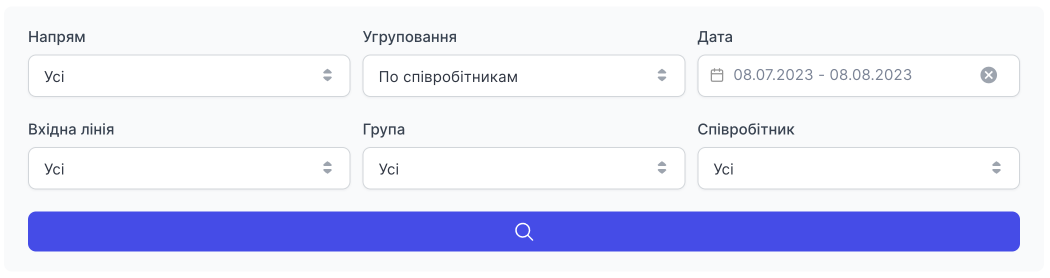
There is filtering by:

  • Direction (all, incoming, outgoing)
  • Grouping (by employees, by days)
  • Date (by day, by time period). You cannot select a time period longer than 30 calendar days.
  • Incoming line (number)
  • Group (all or filter by a specific group)
  • Employee (all or filter by a specific employee)

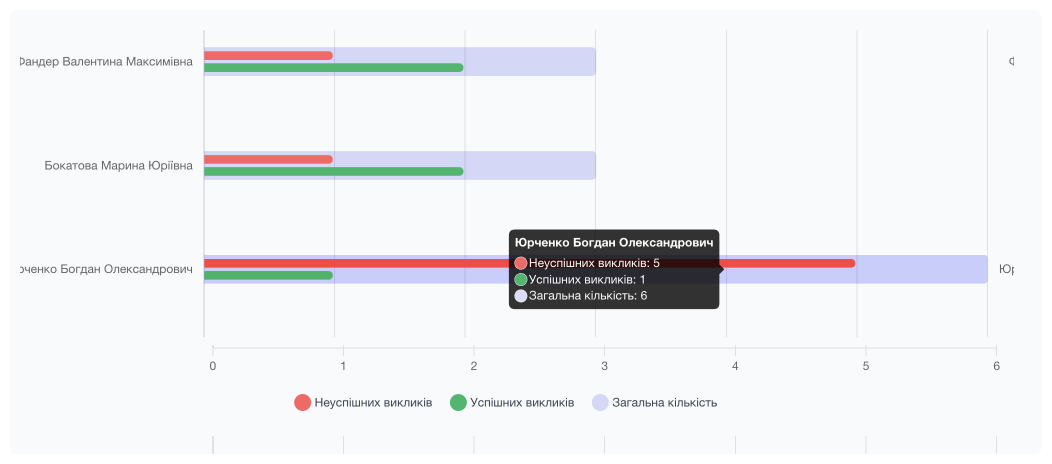
Chart displaying the performance of employees/groups:

Here you can see employees/groups, and when you hover the cursor over a line, a modal window is displayed with a list of calls (all, successful, and unsuccessful) for the period you selected and other filtering items.

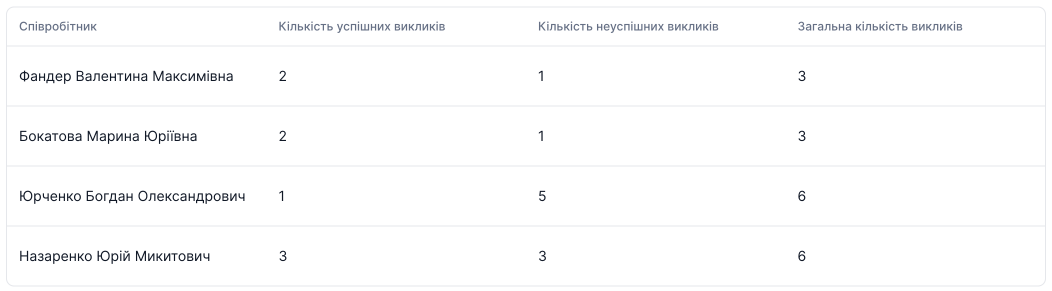
With the Grouping by days filter, or for working with a large amount of data, it will be more convenient to use the table below.