 +1 (786) 209-1854



Buying a number
Purchasing a number for a new user (after registration)
- Go to the "Numbers" tab.
- Click the "Select Plan" button and choose a suitable plan.

- The plan will be added to the cart — click "Continue".
- Step 2 "Add Number" will open.
- Select a country and prefix (filters available: number type, no verification required, SMS enabled) → "Add".
- In the modal window, specify the number of channels → "Add".
- The number will appear in the cart.
- In the cart, click "Continue".
- Next step: "Top Up Account" → "Top Up".
- Select a payment method and complete the payment.
Before purchasing, make sure you have sufficient funds on your balance.
Purchasing a number if a plan is already active
- Go to the "Numbers" tab.

- Click the "Add Number" button.
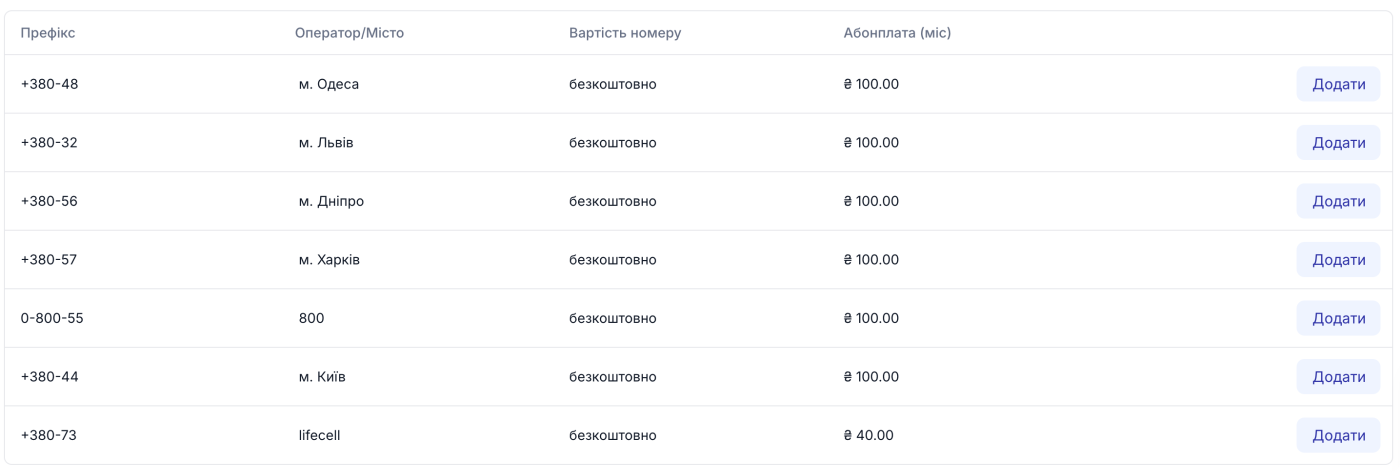
- Select a country and prefix (filter: number type, no verification required, SMS enabled) → "Add".
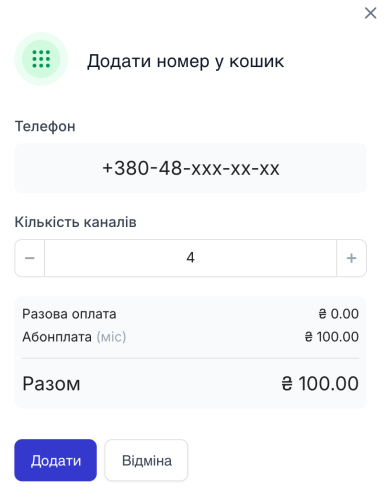
- In the modal window, specify the number of channels → "Add".
- The number will appear in the cart.
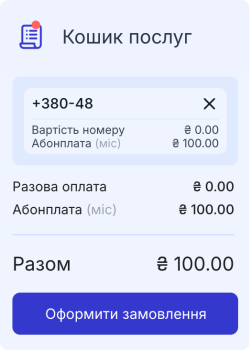
- Select a "Payment Method" — by card or from account balance (if balance is insufficient, payment from balance will be unavailable).
- Click "Place Order".

- When paying from the account balance, funds will be deducted immediately. When paying by card, select the payment method and proceed with payment.
Number of channels
- Landline numbers — minimum 4 channels.
- 0800 numbers — 100 channels, quantity cannot be changed.
- Mobile numbers — minimum 1 channel.
0800 numbers are available for inbound calls only.
To change the number of channels:
- Landline and mobile — through customer support only: live chat on the website or Telegram bot.
- 0800 — changes are not supported.
Auto-renewal is automatically enabled for numbers purchased via the dashboard. You can disable it on the number's page.
Setting up inbound routing
- "Numbers → Active".
- Next to the desired number, click "Select".
- In the modal window, select the routing option and assign a recipient (employee / group / IVR menu).
- "Save".
To modify or delete routing, click "..." next to the number and select the desired action.
Setting up outbound routing
- "Numbers → Active".
- Next to the desired number, click "Select".
- Choose routing and specify the recipient.
- "Save".
To modify/delete — click "..." next to the number.
To add another outbound routing rule: "Numbers → Active" → click "Add" next to the number → select routing and recipient → "Save".
Connecting an external number
Before connecting, create a SIP trunk: "SIP Settings → SIP Trunks → Add SIP Trunk".
- "Numbers → External".
- "Add Number".
- Enter the number in the "Add External Number" field.
- Select the required SIP trunk.
- Click "Add".
Deleting an external number
- "Numbers → External".
- Next to the number, click "..." → "Delete".
- Confirm deletion in the modal window.