+1 (786) 209-1854



Creating an employee
Employee capabilities:
- can be added to groups;
- make and receive calls;
- free communication with each other worldwide;
- add clients to the company's contacts;
- write comments on calls and separately on contacts;
- access to the call log.
Each employee has their own internal SIP line.
Each plan has a limit on the number of employees that can be added.

How do I create an employee?
- Click Employees.

- Click Create employee.

Creating an employee is divided into two stages - Employee data and SIP account settings.

Stage one. Employee data
Fill in the employee's data:
- Last name
- First name
- Middle name
- Employee role
- Phone
- Password
Review the list of roles and their permissions →
The e-mail and password are needed for the employee to sign in to their personal account.
- Click Continue.

Stage two. SIP account settings
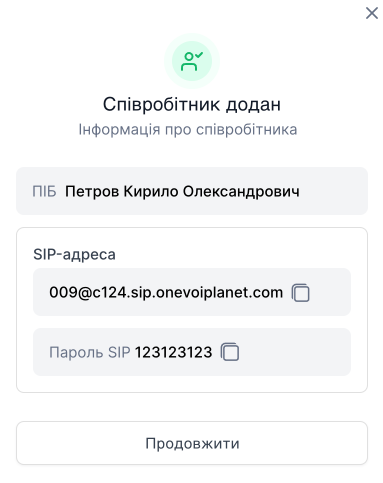
After the employee is created, their SIP address will be automatically generated, which can be used with third-party programs or apps to make calls.

- Select the domain in which the employee will be created.

- Enter the SIP password.

The password will be used for authorization in third-party programs.
- Click Create.

After creation, a window will appear with the full name and SIP data that can be used in third-party programs and apps. Later you can view this data by editing the employee's profile in SIP account.