 +1 (786) 209-1854



Forwarding to a mobile phone number
With forwarding, you can receive calls on your mobile number if your SIP account is not online.
Please note:
-
For forwarding to work smoothly, the employee or group must be assigned to some outgoing direction.
More about how to set up an inbound and outbound direction →
-
If calls are forwarded from an 0800 number to a mobile number, double charging of the call applies (the inbound call rate to 0800 + the outbound call rate from a landline number).
-
If calls are forwarded from a landline number to a mobile number, the call is charged at the standard outgoing call rate.
How to set up forwarding to a mobile phone number?
- Log in to your personal account.
More about how to log in to your personal account →
- Go to Employees.

- Click the employee's full name or click the ... button and select Edit.

- Click SIP account.

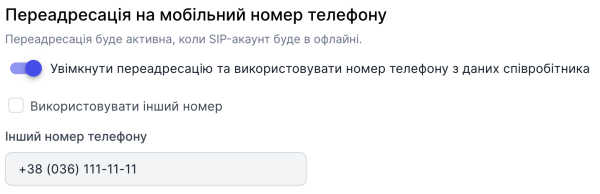
- Configure forwarding:
-
Enable forwarding and use the phone number from the employee's data - this is a toggle to activate or deactivate forwarding using the phone number set in the employee's profile.
-
Use another number - this option lets you set any number to which calls will be forwarded.
- Click Save.

Forwarding for the employee has been successfully configured.