+1 (786) 209-1854

Language: English
  • English
  • Українська
  • Русский
  • Polski
  • Deutsch
  • Français
  • Español
  • Português
  • Nederlands
  • Svenska
  • עברית
  • العربية
  • 中文
  • हिन्दी
  • Bahasa Indonesia
  • 日本語
  • Italiano
  • Türkçe
  • 한국어
  • Tiếng Việt
  • ქართული
  • Filipino
  • ไทย
  • Čeština
  • Română
  • Ελληνικά
  • Dansk
  • Norsk
  • Suomi
  • বাংলা
  • اردو
  • فارسی
  • Bahasa Melayu
  • தமிழ்
  • Azərbaycan
  • Հայերեն
  • Қазақша
  • Oʻzbekcha
  • Magyar
  • Български
  • Slovenčina
  • Hrvatski
  • Slovenščina
Language: English
  • English
  • Українська
  • Русский
  • Polski
  • Deutsch
  • Français
  • Español
  • Português
  • Nederlands
  • Svenska
  • עברית
  • العربية
  • 中文
  • हिन्दी
  • Bahasa Indonesia
  • 日本語
  • Italiano
  • Türkçe
  • 한국어
  • Tiếng Việt
  • ქართული
  • Filipino
  • ไทย
  • Čeština
  • Română
  • Ελληνικά
  • Dansk
  • Norsk
  • Suomi
  • বাংলা
  • اردو
  • فارسی
  • Bahasa Melayu
  • தமிழ்
  • Azərbaycan
  • Հայերեն
  • Қазақша
  • Oʻzbekcha
  • Magyar
  • Български
  • Slovenčina
  • Hrvatski
  • Slovenščina

Increase the number of calls from customers with a widget CallBack

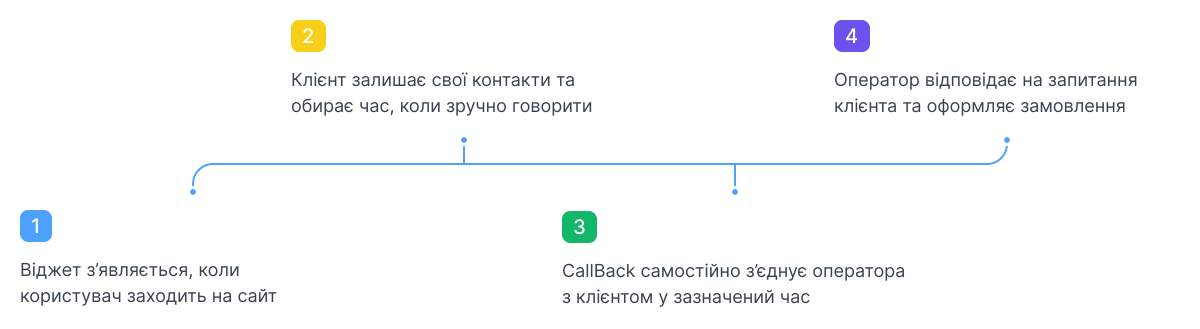
How the callback widget works
background
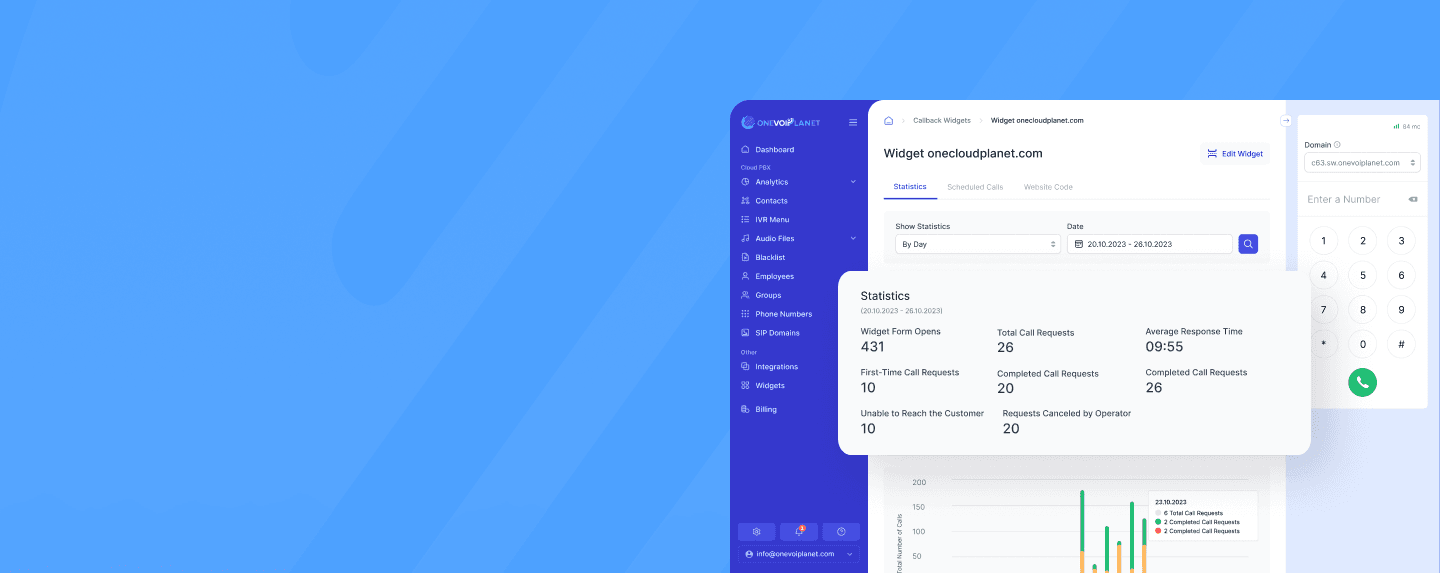
See how many extra calls the CallBack widget will bring you. Install it now!
Flexible tariffs for your business

Popular

Start

Basic virtual PBX functionality for a quick and easy start

8$

/ month

Start plan includes:
icCheck

Ability to connect 1 number

icCheck

5 employees in the plan

icCheck

Call history for the selected period

icCheck

Audio recording of all conversations

icCheck

Single-level voice menu (up to 15 sec)

icCheck

CRM integrations

icCheck

Call forwarding

icCheck

Mobile app for calls

Business

Advanced virtual PBX functionality for medium and large teams

14$

/ month

All features of the Start plan, plus:
icCheck

Ability to connect up to 3 numbers

icCheck

12 employees in the plan

icCheck

Multi-level voice menu (up to 30 sec)

Included in the Business plan

Connect the CallBack widget for free

IllustrationBannerIllustrationBannerMob
Callback for office, business and shop
icon-1
Business
icon-2
Call centers
icon-3
Online stores
icon-4
Offices
icon-5
For home
icon-6
Corporate
Why choose OneVOIPlanet
illustration-1
Virtual PBX OneVOIPlanet
The key advantage of OneVOIPlanet PBX is the ease of managing the entire IP telephony system from a single interface. Control various aspects of work: missed calls, IVR menu, statistics and much more. Simplify system administration and increase the efficiency of communication with customers and employees.
illustration-2
Integration with any CRM
Automate the process of handling calls and communicating with customers. Store all information about customers and interactions with them in one centralized place. Store call history and other important information in the CRM system and keep records of communication with customers.
illustration-3
Handy call analytics
Get important information about the number of calls, their duration, call time, operator efficiency and other key metrics. Analyze the effectiveness of your communication strategy, areas that need to be changed, and identify potential problems and ways to solve them.
illustration-4
Design Options
Customize your telephony based on your corporate style and business goals. Create a personalized widget and adjust its display time, design and text based on your needs. Improve customer satisfaction and brand perception.
Still in doubt? Leave your contact and a manager will call you at a convenient time!

Frequently Asked Questions

What is a callback widget?

arrow

A CallBack widget is an interactive element that you create in your OneVOIPlanet account and embed on your website. When a visitor leaves their phone number, it connects them with your operator, so no additional hardware is required.

The widget is fully configurable: you set its name, the site address, working hours, the employee or group that receives the calls, its appearance, and display rules.

How does the callback function work?

arrow

A visitor requests a call through the widget on your site and leaves their phone number. The request is routed to the employee or group you assigned to the widget, and OneVOIPlanet connects the caller with an operator.

You control this behaviour with the widget settings, including working hours and a countdown that shows the visitor the maximum time before they are called back.

What does it mean to order a callback?

arrow

Ordering a callback means a visitor uses the widget on your site to leave their phone number. Their request is then delivered to the assigned employee or group, who calls the visitor back to provide assistance.

Where can I order a callback?

arrow

A visitor orders a callback directly on your website, wherever the OneVOIPlanet CallBack widget is displayed. They open the widget, enter their phone number, and submit the request.

Why install the CallBack widget on the site?

arrow

The CallBack widget gives visitors a fast, one-step way to be contacted without dialing a number themselves. Because it is created in your OneVOIPlanet account and simply embedded on the site, it needs no extra hardware and routes each request straight to the right employee or group.

Is it possible to disable callback on some pages of the site?

arrow

The widget appears only where its code snippet is embedded, so you control where it shows by adding the code to your site. To install it, copy the widget code and paste it as the last script inside the body of your root index.html file.

You can also limit when it appears through the display settings, for example by hiding it outside working hours.

What will happen if the customer orders a callback and the manager does not answer immediately?

arrow

Each request is routed to the employee or group assigned to the widget, so a call directed to a group can be picked up by any available member. You can define working hours for receiving calls and hide the widget outside those hours, and a countdown shows the visitor the maximum time before they are called back.