 +1 (786) 209-1854



Integration with NetHunt
NetHunt - database organization, sales funnel, business process automation, tasks and team performance control — all in one CRM system. The best choice for B2B companies.
Integration capabilities
- Call log (all incoming and outgoing calls).
- Listening to the call audio recording in the CRM.
- Tracking missed calls.
- A contact is created automatically after a call ends.
- Contact call history.
Setting up the integration with NetHunt
To set up the NetHunt integration with OneVOIPlanet, you need to:
- Click Integrations.

- Go to NetHunt.

- Activate the integration.

- In the E-mail field, enter the email the NetHunt account is registered to. (For example:
nethunt@onevoiplanet.me).
- In the API Key field, enter the generated key (token) that allows identifying the NetHunt account. How to generate an API Key?
- Click Save.
After the integration is set up, all the folders needed to work with calls will be generated automatically in NetHunt.

How to generate an API Key?
- Go to your NetHunt account.
- Click Settings.

- In the Integrations section, select Apps and other integrations

- Click Generate API Key
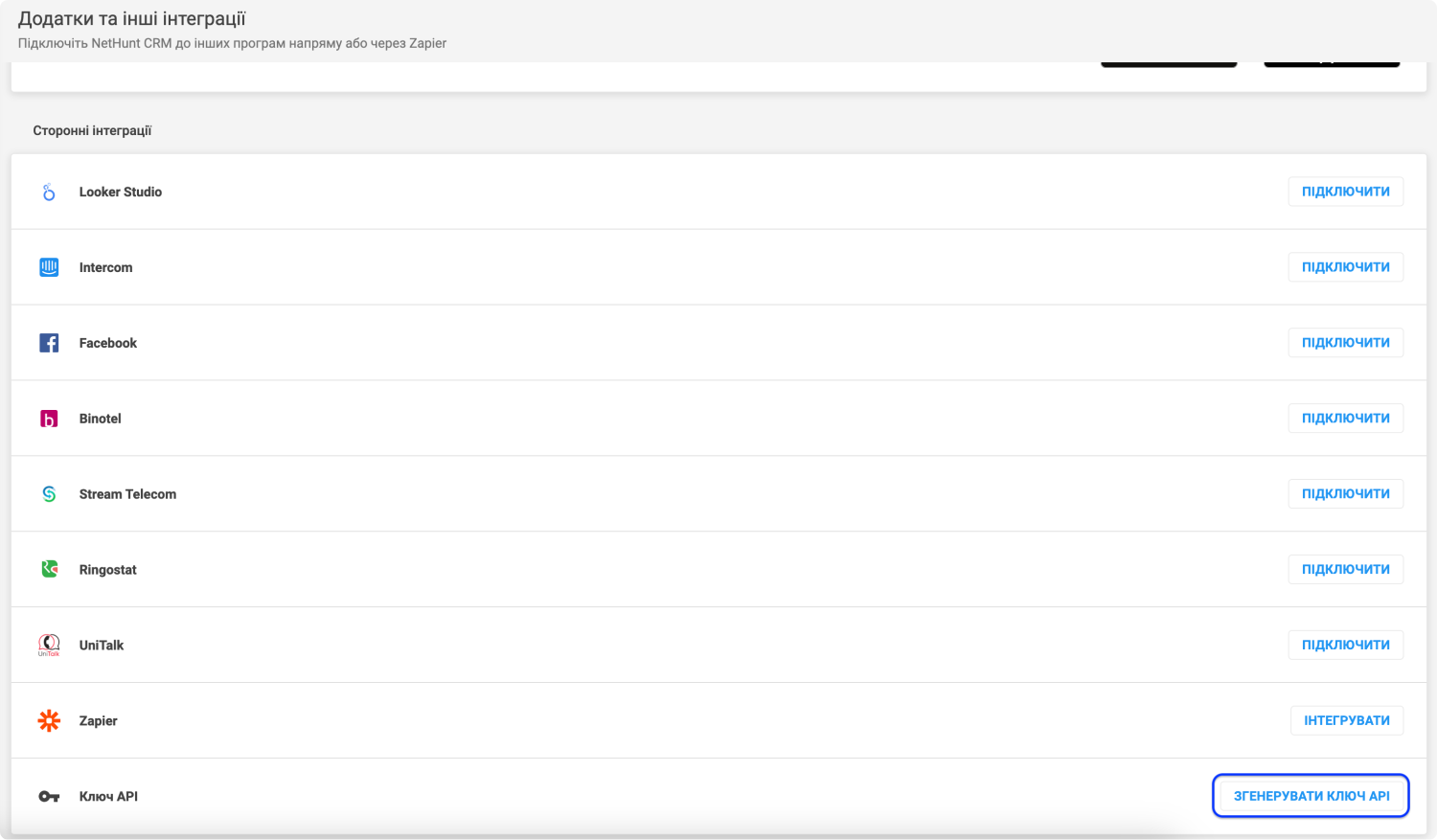
- The API key is needed at the configuration stage in your OneVOIPlanet personal account.