+1 (786) 209-1854

Language: English
  • English
  • Українська
  • Русский
  • Polski
  • Deutsch
  • Français
  • Español
  • Português
  • Nederlands
  • Svenska
  • עברית
  • العربية
  • 中文
  • हिन्दी
  • Bahasa Indonesia
  • 日本語
  • Italiano
  • Türkçe
  • 한국어
  • Tiếng Việt
  • ქართული
  • Filipino
  • ไทย
  • Čeština
  • Română
  • Ελληνικά
  • Dansk
  • Norsk
  • Suomi
  • বাংলা
  • اردو
  • فارسی
  • Bahasa Melayu
  • தமிழ்
  • Azərbaycan
  • Հայերեն
  • Қазақша
  • Oʻzbekcha
  • Magyar
  • Български
  • Slovenčina
  • Hrvatski
  • Slovenščina
Language: English
  • English
  • Українська
  • Русский
  • Polski
  • Deutsch
  • Français
  • Español
  • Português
  • Nederlands
  • Svenska
  • עברית
  • العربية
  • 中文
  • हिन्दी
  • Bahasa Indonesia
  • 日本語
  • Italiano
  • Türkçe
  • 한국어
  • Tiếng Việt
  • ქართული
  • Filipino
  • ไทย
  • Čeština
  • Română
  • Ελληνικά
  • Dansk
  • Norsk
  • Suomi
  • বাংলা
  • اردو
  • فارسی
  • Bahasa Melayu
  • தமிழ்
  • Azərbaycan
  • Հայերեն
  • Қазақша
  • Oʻzbekcha
  • Magyar
  • Български
  • Slovenčina
  • Hrvatski
  • Slovenščina

Integration with ZohoCRM

ZohoCRM - helps you interact with potential and existing customers, gain valuable insights about your business, build scalable sales processes, and grow your company faster.

Integration capabilities

  • Call log (all incoming and outgoing calls).
  • Listening to call audio recordings in the CRM.
  • Tracking missed calls.
  • A contact is created automatically after a call ends.

Setting up the ZohoCRM integration

To set up the ZohoCRM integration with OneVOIPlanet, you need to:

  1. Log in to your ZohoCRM account

  2. Go to your OneVOIPlanet account

  3. Click Integrations.

  1. Go to ZohoCRM.

  1. Click Connect

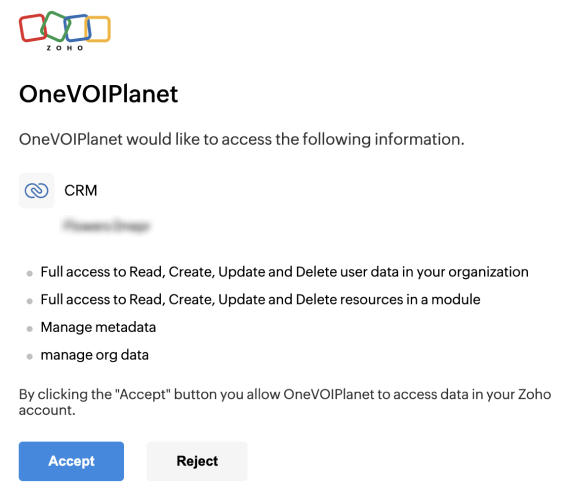
  1. In the window that opens, click Accept
  1. After connecting, you will be automatically returned to your OneVOIPlanet account