 +1 (786) 209-1854



Tariff management
How can I view detailed information about my tariff?
- To view detailed information about your tariff, go to Finance.

- Click My tariff.

-
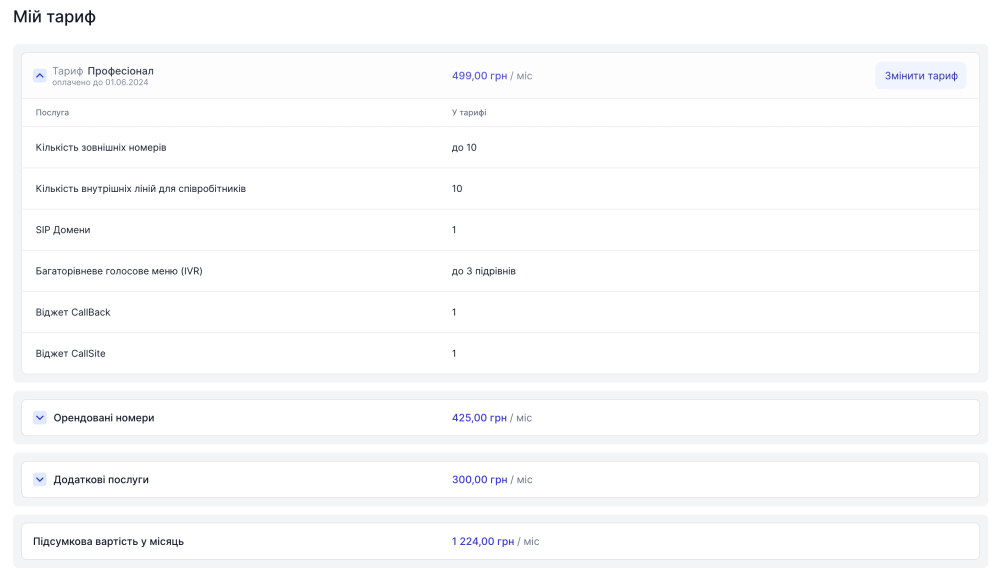
On the My tariff page, you can find out the following information:
- The tariff name, its price, and the date up to which it is paid
- The services included in the tariff
- Your rented numbers, the subscription fee for each number, the number of channels for each number, and the total subscription fee for these numbers
- The list of your additional services, the subscription fee for each additional service, and the total subscription fee for additional services
- The total subscription fee cost
How to change the tariff?
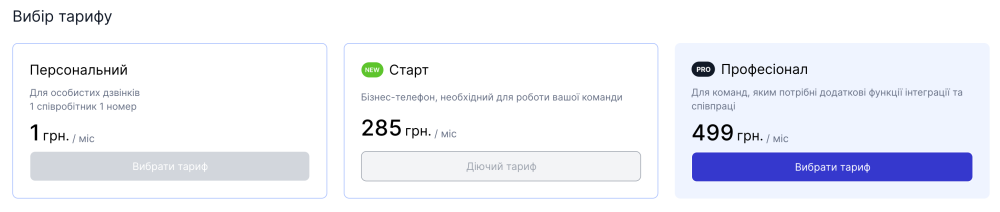
Please note that a tariff can only be changed to one of those following the current one. To switch to a simpler tariff than the current one, you need to contact technical support →
- Go to the My tariff page
- Click Change tariff.
- Select the tariff you want to switch to and make sure there are sufficient funds in your balance.
- Click Save.

If there are sufficient funds in your balance, the tariff will be changed within a few minutes.