+1 (786) 209-1854

Language: English
  • English
  • Українська
  • Русский
  • Polski
  • Deutsch
  • Français
  • Español
  • Português
  • Nederlands
  • Svenska
  • עברית
  • العربية
  • 中文
  • हिन्दी
  • Bahasa Indonesia
  • 日本語
  • Italiano
  • Türkçe
  • 한국어
  • Tiếng Việt
  • ქართული
  • Filipino
  • ไทย
  • Čeština
  • Română
  • Ελληνικά
  • Dansk
  • Norsk
  • Suomi
  • বাংলা
  • اردو
  • فارسی
  • Bahasa Melayu
  • தமிழ்
  • Azərbaycan
  • Հայերեն
  • Қазақша
  • Oʻzbekcha
  • Magyar
  • Български
  • Slovenčina
  • Hrvatski
  • Slovenščina
Language: English
  • English
  • Українська
  • Русский
  • Polski
  • Deutsch
  • Français
  • Español
  • Português
  • Nederlands
  • Svenska
  • עברית
  • العربية
  • 中文
  • हिन्दी
  • Bahasa Indonesia
  • 日本語
  • Italiano
  • Türkçe
  • 한국어
  • Tiếng Việt
  • ქართული
  • Filipino
  • ไทย
  • Čeština
  • Română
  • Ελληνικά
  • Dansk
  • Norsk
  • Suomi
  • বাংলা
  • اردو
  • فارسی
  • Bahasa Melayu
  • தமிழ்
  • Azərbaycan
  • Հայերեն
  • Қазақша
  • Oʻzbekcha
  • Magyar
  • Български
  • Slovenčina
  • Hrvatski
  • Slovenščina

Description of the bot's capabilities

In the Telegram bot, you can:

  • Go to your account
  • Choose a language for the bot
  • View your company's balance
  • Go to the knowledge base
  • Contact technical support
  • Receive notifications about a new deferred callback widget request
  • Receive notifications about a missed call
  • Receive notifications about company deactivation
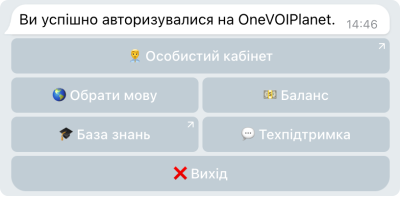
So that you can use all these capabilities, you need to connect the Telegram bot to a OneVOIPlanet user

More about how to connect the Telegram bot to a user →

Please note! The Exit button will disconnect the user from the Telegram bot and reset all settings.

